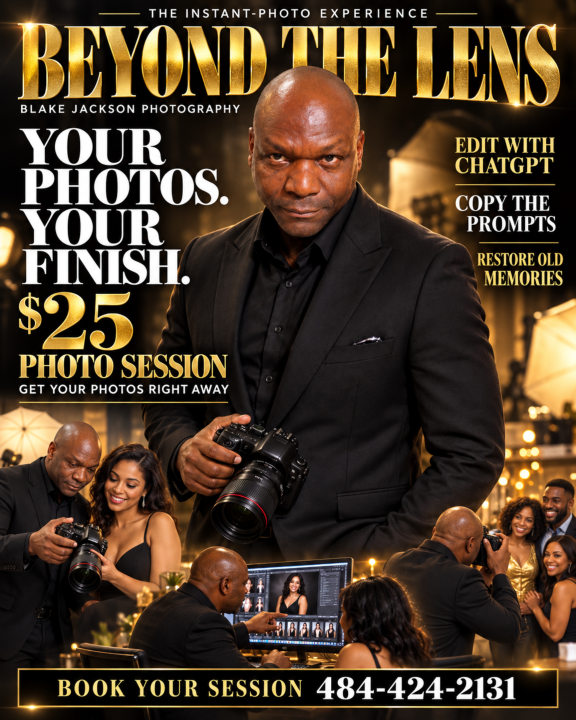

THE INST
ANT
-PHOTO EXPERIENCE
Y
our Photos. Y
our Finish.
BLAKE J
ACKSON PHOTOGR
APHY
01
$25
PHOTO SES
SION
Get photographed.
Receive your photos right away
.
Make the finish your own.
A simple guide to editing your pictur es with ChatGPT - including pr ompts you can copy, r euse, and mak e your own. By Blak e Jackson Photography Call 484-424-2131 to book your session
Y
OUR $25 SES
SION
A portrait. A possibility
.
BLAKE J
ACKSON PHOTOGR
APHY
02
I capture the photograph.
Y
ou choose the finishing touch.
Y our $25 photo session includes the photos deliver ed at your session by memory card or immediate online upload, plus this editing guide. Download your o riginals and begin when you ar e r eady . 01 COME IN We mak e your photographs together . T ell Blak e the look or purpose you have in mind. 02 GET Y OUR PICTURES R eceive the car d or open your download link befor e you leave. Save the files to your own device. 03 MAKE THEM Y OURS F ollow this guide to try a natural polish, a new backgr ound, or another cr eative finish. Call 484-424-2131 to book and confir m the session length, number of photos, and delivery method. Online transfer depends on a working connection.
ST
AR
T HERE
Y
our first edit
BLAKE J
ACKSON PHOTOGR
APHY
03
1. Save your original.
Download the full photo fr
om your session. K
eep an untouched
copy in a separate folder
.
2. Open ChatGPT
.
Use
the
ChatGPT
app
or
visit
chatgpt.com.
Sign
in
and
open
a
new
chat.
3. Attach one photo.
Use the attachment control to choose your saved pictur
e. W
ait for
it to finish attaching.
4. T
ell it what to change.
Copy a pr
ompt fr
om this guide and send it with the image. Ask for
the edited pictur
e itself
.
5. Review
, refine, and save.
Compar
e the r
esult with your original. R
equest one small
adjustment at a time, then use the image save or download
contr
ol.
Image tools and usage limits depend on your account. If an editing option is
unavailable, follow the guidance shown in your app. The pr
ompts in this
guide ar
e fr
ee to r
euse.
EXAMPLE 01
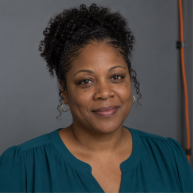
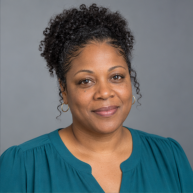
A natural portrait polish
BLAKE J
ACKSON PHOTOGR
APHY
04
BEFORE
AFTER
Illustrative AI-generated comparison; fictional subject. These panels show the intended
change, not a r
ecor
ded client edit.
The goal
Lif
t a dull portrait and r
emove one small distraction while
k
eeping the person r
ecognizable.
COPY THIS PROMPT
Edit this photo
. Gently impr
ove the e
xposur
e and natural
color
. R
emove the orange
cable at the far right. P
r
eserve my
face, age, skin tone, natural skin te
xtur
e, hairstyle, body,
pose, and clothing. K
eep the same cr
op and backgr
ound.
R
etur
n the edited image.
Check: Does it still look lik
e you? Compar
e eyes, teeth, hair edges, and
clothing with the original.
EXAMPLE 02
Change the setting
BLAKE J
ACKSON PHOTOGR
APHY
05
Use your original session photo
. Describe one clear
setting.
BEFORE
A portrait with a simple studio backgr
ound.
AFTER - Y
OUR T
ARGET
The same person in a war
m interior with matching light.
COPY THIS PROMPT
R
eplace only the backgr
ound of this photo with an elegant
sitting r
oom in war
m neutral colors. Match the new lighting
and perspective to the e
xisting portrait. P
r
eserve my identity,
facial featur
es, age, skin tone, body, pose, hairstyle, and
clothing. K
eep my whole head in the frame. R
etur
n the edited
image.
Refine the result
“Mak
e the r
oom simpler and the backgr
ound sof
ter
. P
r
eserve
the person as in the original photo
.”
Check hair, glasses, shadows, and hands. If your face changes, r
etur
n to
the original and r
equest a smaller edit.
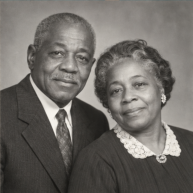
EXAMPLE 03 - RESTORA
TION
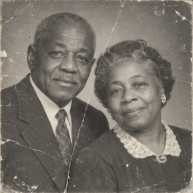
Bring a memory forward
BLAKE J
ACKSON PHOTOGR
APHY
06
BEFORE
AFTER
Illustrative AI-generated comparison; fictional family
. It shows a restoration goal, not an
authenticated historical photograph.
Start with a clear scan
Scan the print or photogr
aph it straight on in even light, with
no glar
e. Save that original captur
e.
COPY THIS PROMPT
R
estor
e this old photograph. R
emove surface scra
tches and
dust, r
educe fading, and gently impr
ove contrast. P
r
eserve
each person's identity, age, e
xpr
ession,
facial featur
es,
clothing, and the original composition. K
eep it bla
ck and
white. Do not invent missing facial details. Return the
restored
image.
Check: Compar
e r
estor
ed details car
efully
. K
eep your original as the family
r
ecor
d.
Y
OUR REUSABLE PROMPT COLLECTION
Make it your own
BLAKE J
ACKSON PHOTOGR
APHY
07
Remove a small distraction
R
emove only the small object I describe: [name it and give its
location].
R
ebuild
that
ar
ea
naturally
.
K
eep
the
person
and
all
other details unchanged.
T
ry a classic black-and-white finish
Convert this portrait to a balanced black-and-white photograph
with rich midtones and gentle contrast. P
r
eserve natural te
xtur
e
and all facial details.
Tidy a clothing detail
R
educe the small wrinkle at [location] while k
eeping the fabric
te
xtur
e, fit, seams, and body shape unchanged.
Dial back an edit
Start again fr
om my original photo
. Apply only [one change].
K
eep the effect subtle and pr
eserve my identity and natural
te
xtur
e.
R
eplace the wor
ds in brack
ets with your own description. Begin each
pr
ompt with “Edit this photo
” and finish with “
R
etur
n the edited image.”
BLAKE JACKSON PHOTOGRAPHY
Ready for your close-up?
BLAKE J
ACKSON PHOTOGR
APHY
08
$25 photo session
Y our photographs, deliver ed right away . A guide to help you edit them your way . Call Blak e to set up an appointment.484-424-2131
Before you share your edit
Compar
e with your original. Check your face, hands, and
clothing.
Save a new copy
. Edit photos you own or have per
mission to use.
Jump back in
Start your first edit
Open ChatGPT
Instruction r
efer
ence: Official OpenAI documentation: Image generation. Check
ed
October 19, 2026. Examples and pr
ompts ar
e illustrative; r
esults vary
. This guide is
independently pr
oduced by Blak
e Jackson Photography
.